Plex Mobile
Rebuilding the app operators rely on every shift, redesigned for gloves, glare, and connectivity drop-offs.
The Challenge
Plex Mobile existed long before design was a consideration. It had been extended feature by feature until the workflows operators depended on most, barcode scanning, inventory movement, production reporting, were buried under interaction patterns that made sense on a desktop, not on the shop floor.
To be successful, the app had to run on two very different classes of hardware: rugged handheld barcode scanners with small screens and physical keypads, and consumer mobile phones. It also had to hold up in the actual conditions of a manufacturing floor: workers in gloves, inconsistent lighting, background noise, and wifi that dropped without warning. Simply updating a modern design on top of the existing app would not be enough to improve usability or reduce errors. The workflows themselves needed to be rebuilt from the ground up.
The Approach
- Onsite Research. I spent time on manufacturing floors observing operators using the existing app in real conditions, collecting data on user behaviors, environmental noise, and activity factors. I watched people scan barcodes one-handed while holding materials, squint at low-contrast screens under fluorescent lighting, and lose their place mid-task for various reasons. During the design process iterations of the app were tested with different experts interally and externally, leveraging real facilities to test across language barriers.
- High Performance HMI Principles. I grounded the redesign in High Performance HMI principles, the same clarity and responsiveness standards used in SCADA systems. Utilizing high-contrast states, purposeful status colors, and interfaces designed around user enviroments and physical demands creating a system that reduced errors and improved onboarding experiences.
- Designing for Constraints. Gloves meant targets needed to be larger and more forgiving. Poor lighting meant color and contrast decisions had to hold up outdoors and under warehouse lighting alike. Device durability meant interactions needed to work identically on a five-inch phone screen and a ruggedized scanner with a much smaller display. Connectivity drop-offs meant the app needed to behave predictably when it lost signal mid-task, or device powered down unexpectedly.
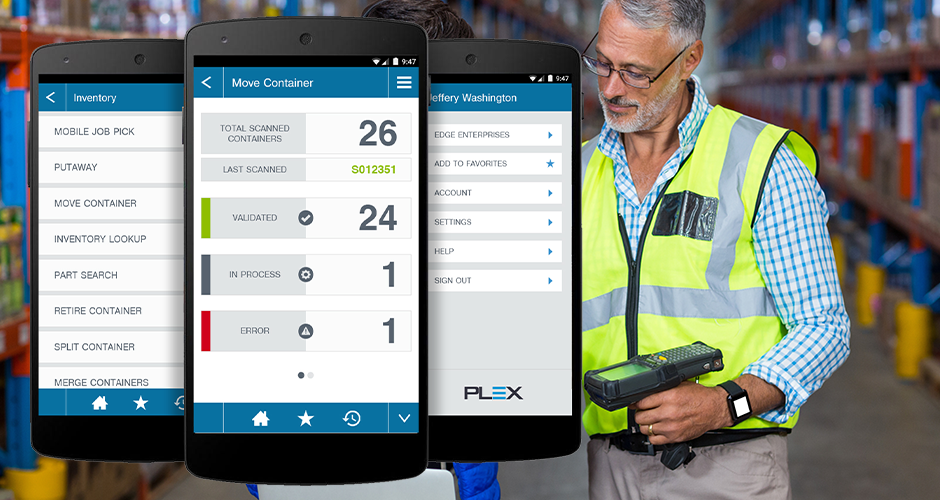
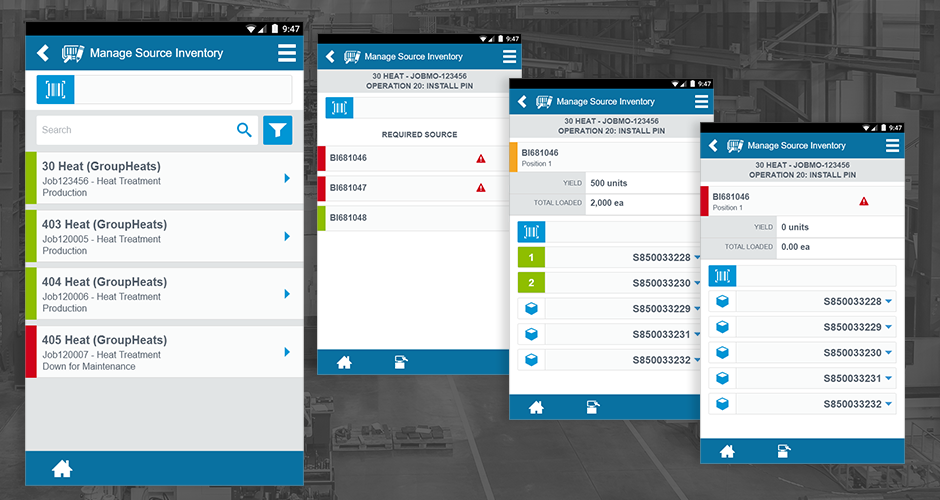
- Workflow Simplification. With those constraints as the frame, I rebuilt the core workflows operators used most: barcode scanning, inventory tracking (move container, putaway, retire container, split and merge container), part search, and production reporting. Each flow was reduced to the fewest steps possible, with status feedback, validated, in process, error, visible at every step so operators always knew where they stood without having to ask.
Built for the Floor, Not the Desk
The redesigned interface prioritized large touch targets, high-contrast status indicators, and workflows that could be completed one-handed on either a phone or a handheld scanner.
Status at a Glance
Every scan produced immediate, unambiguous feedback, validated in green, in process in gray, error in red, so operators could self-correct without stopping to ask a supervisor.
The Impact
The redesign cut the number of steps required for the most common workflows and gave operators status feedback they could trust without a second look. Streamlining scanning, inventory, and reporting flows improved accuracy and onboarding.
Establishing High Performance HMI-grounded contrast and status standards for this project also gave later Plex mobile work a consistent reference point.
Why It Matters
It's easy to design for the environment you can see from your desk. This project only worked because it started from the opposite assumption: that the person using it would be wearing gloves, standing under bad lighting, holding materials in one hand, and losing signal at the worst possible moment. Designing for the harshest realistic conditions, instead of the average ones, raised the bar for the whole experience.
Key Takeaways
- Field research beats simulated conditions in revealing what people actually do under real-world constraints.
- HMI-grade clarity standards translate directly into accuracy gains in high-pressure environments.
- Designing for the worst device and the harshest conditions raises the baseline for every device.
- Predictable status feedback reduces cognitive load more than any single visual polish decision.